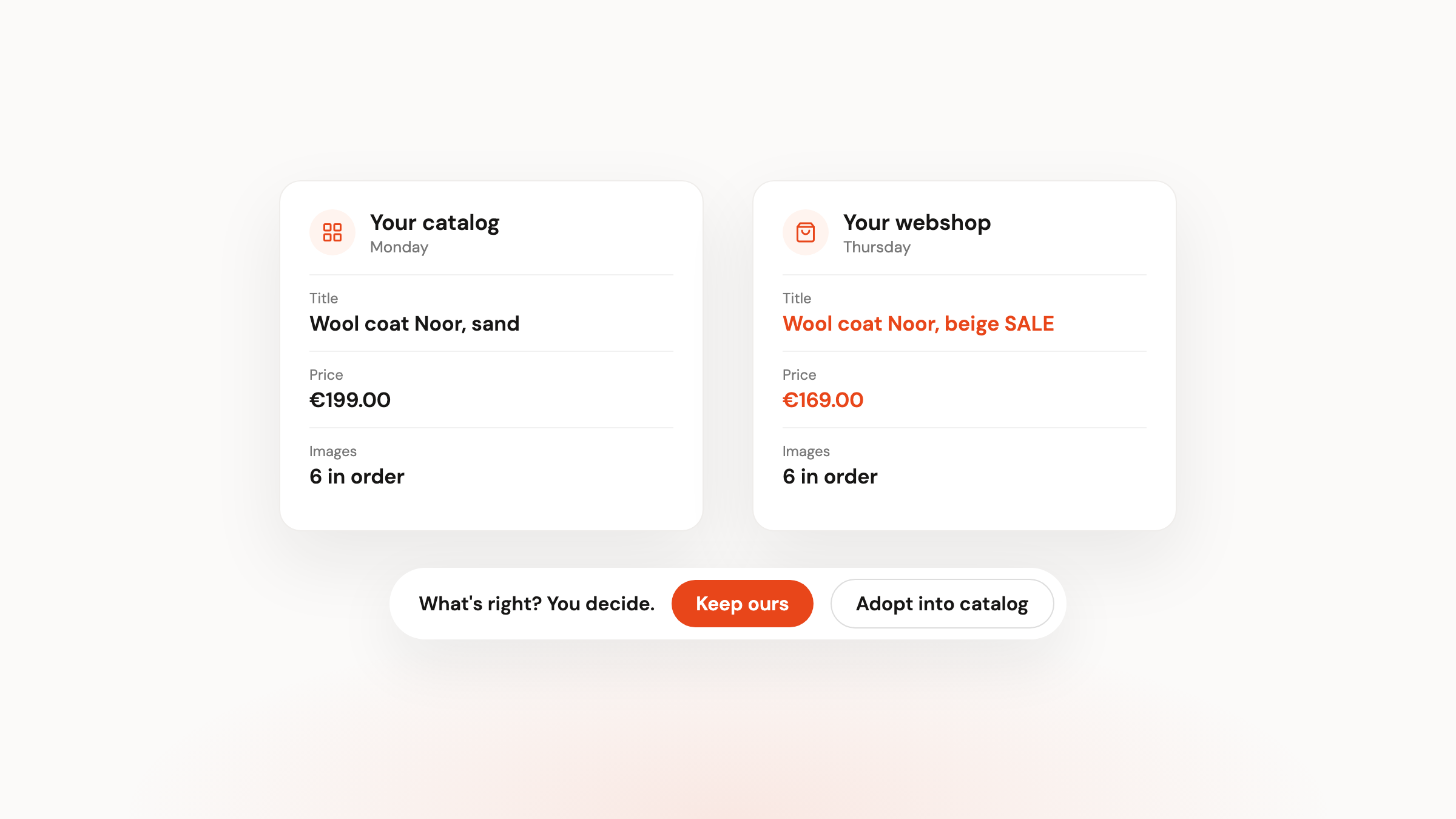
On Monday everything is right. On Thursday a colleague quickly changes a price in Shopify for a promotion, an app overwrites a product title and a supplier sends a new spreadsheet. Nobody does anything wrong, and still your webshop says something different from your catalog.
Product data quality after go-live means that what sits on your channels stays the same as your catalog. You do not get there by checking more often. You get there with two clear agreements and an overview of what changes. Here is how.
What is drift in product data?
Drift is the gap that opens after go-live between your catalog and what is on your channels. It starts small and grows with every channel, every colleague and every integration you add.
An example. Your catalog says "Wool jumper navy" at 89.95 euro. In Shopify a promotion left it at 69.95 euro, and an SEO app changed the title to "Blue jumper men". Both changes once had a reason. Now neither matches your catalog, and nobody knows.
How does drift happen? Three causes
- Quick fixes in the webshop. Someone changes a price or a title. The problem is solved, and nobody puts the change back into the catalog.
- Apps that write along. An SEO app, a translation plugin or a feed tool changes data without anyone noticing.
- New data from outside. A supplier sends a new spreadsheet, your stock system sends different prices. Your catalog then runs ahead of what is live, or behind it.
What does a mismatch cost you?
A mismatch rarely costs revenue straight away. It costs trust, and you notice that later. A customer sees a different price in your webshop than in your ad. A search engine shows an old title. An AI assistant mentions a feature that is no longer right, because it read it from your product page.
With ads it can cost money directly. If the price on your product page differs from the price in your product feed, Google Merchant Center can disapprove the product, and repeated mismatches can even suspend your account.
And your team loses time. Nobody knows which version is right, so everyone checks everything themselves.
Which source leads? Agree on this
Do not start by checking more often. Spot checks cannot keep up with hundreds of products. Agree on two things: what is the right source, and who decides when two sources disagree?
Usually your catalog is the right source. Use these rules when you find a mismatch:
- Was it a mistake? Put the catalog value back on the channel.
- Was it a deliberate choice, such as a promotional title? Adopt it into your catalog, or keep it on that channel on purpose.
- Did the change come from a supplier? Check it and put it in your catalog, so every channel gets it.
- Does nobody know where the change came from? Keep your catalog value and find out which app or integration writes along.
A channel can be different, as long as it is a choice and not an accident.
Where to start this week
In one hour you can see how much drift you have:
- Pick your twenty best-selling products.
- Compare title, price, compare-at price and first image between your catalog and your webshop.
- Do the same for one other channel, such as your Google Shopping feed.
- For every mismatch, write down where it came from: a colleague, an app or a supplier.
- Decide per field which source leads.
If twenty products already show a few mismatches, it is worth comparing your whole catalog.
Where Automated Commerce makes the difference
Many tools are done once your product is online. Automated Commerce keeps watching. When something changes in Shopify, it is compared with your catalog. A difference is not silently overwritten and not silently adopted. You see both versions side by side, and you decide.
- You see in one overview what changed, per product and per field.
- That covers title, description, price, compare-at price, images and SEO fields.
- The same mismatch on dozens of products is resolved in one go.
- Your catalog leads by default, and you can change that per field.
- A change the integration missed still surfaces, because the whole catalog is re-read every week by default.
This works most completely on Shopify. See which other channels you can connect. If your product data still lives in many places, start with What is a PIM system? Already working with Automated Commerce? The overview is ready under Channels, in To review.
Frequently asked questions
How do I keep my catalog and Shopify in sync?
First agree on what leads, usually your catalog. Then compare every change in Shopify with that catalog, so an edited title or price doesn't stay unnoticed. Automated Commerce puts those differences in one overview, where you resolve them per product or in one go. After that you push the right version back.
How much time does it take to keep up with product data differences?
Checking by hand doesn't work: spot checks on hundreds of products always miss something. When changes are compared with your catalog automatically, you only spend time on the real differences. Similar differences are resolved in one go. Keeping up becomes a short list instead of a search.
Are my team's changes reverted automatically?
No. By default a change in Shopify is not simply overwritten. You see your catalog and the channel side by side, and you choose what is right. That way no deliberate edit by a colleague disappears. Fields that may always follow the channel's value are set by you under Field authority.
How does this work with thousands of products?
With many products it is about patterns, not individual cases. An app that changes the same title on a hundred products is resolved in one go instead of a hundred times. On top of that the whole catalog is re-imported every week by default, so a missed change still surfaces.
Does my team have to stop making edits directly in Shopify?
No. Quick edits in Shopify remain possible. The difference is that they no longer go unnoticed. Every change is compared with your catalog and appears in your overview when there is a difference. Then you choose what is right. Your team works the way it is used to, and you keep the overview.
What is the difference between seeing drift and simply syncing?
Simple syncing sends data one way: it overwrites what is there, without asking. Seeing drift means you first look at what has changed and what leads. Deliberate choices stay, and mistakes surface. That way your webshop stays right without any of your team's work getting lost.